
Overview
Modern cloud platforms generate vast amounts of operational data. GreenLake customers often find themselves toggling between multiple interfaces, running complex API queries, and piecing together information from various services to understand their infrastructure state. What if your AI assistant could directly interact with your GreenLake environment in a secure, controlled manner?
The Model Context Protocol (MCP) makes this possible by providing a standardized way for AI assistants to access external data sources and tools. This article explores how MCP servers bring intelligent, conversational access to GreenLake APIs while maintaining strict security boundaries.
The Challenge: Bridging AI and Enterprise APIs
AI assistants have transformed how we work with information, but they face a fundamental limitation when it comes to enterprise platforms: they don't have direct access to your live operational data. When you ask questions about your GreenLake environment, the AI can only provide general guidance, not specific insights based on your actual workspaces, devices, or audit logs.
Traditional approaches to this problem involve building custom integration layers, managing authentication flows, and maintaining bespoke code for each API endpoint. This creates several challenges:
- Development overhead: Each integration requires custom code and ongoing maintenance
- Security concerns: Storing credentials and managing access control adds complexity
- Limited reusability: Custom integrations rarely work across different tools or AI platforms
- Slow iteration: Adding new capabilities means writing more integration code
Introducing the Model Context Protocol
The Model Context Protocol is an open standard that enables AI applications to securely connect to external data sources and tools. Think of it as a universal adapter that allows AI assistants to "plug in" to your enterprise systems in a controlled, standardized way.
MCP operates on a client-server architecture:
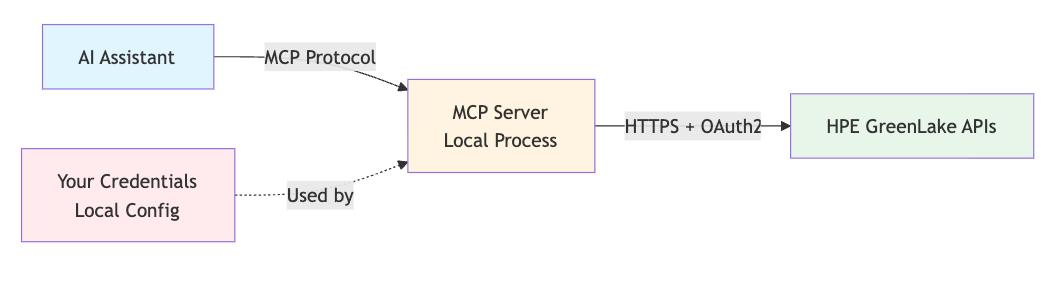
The protocol defines three core primitives:
- Resources: Data sources that can be read (configuration files, API responses, documents)
- Tools: Functions that can be invoked (API calls, calculations, data transformations)
- Prompts: Reusable templates for common operations
For GreenLake integration, MCP servers primarily expose tools that map to API endpoints, allowing AI assistants to query workspaces, retrieve device information, search audit logs, and more.
Why MCP Servers Are a Natural Fit for GreenLake?
MCP servers bring a set of benefits that align well with GreenLake’s secure, enterprise-scale architecture. At a high level, they provide local execution, per-user credentials, and a standardized interface for AI tools to safely interact with GreenLake APIs.
Local Execution, Complete Control
An MCP server runs entirely on your machine. It doesn’t open network ports or send your credentials to an external service. Instead, it acts as a controlled bridge between your AI assistant and the GreenLake APIs.
This design provides:
- Data stays local: API responses are processed on your device before the AI sees them.
- Credential isolation: OAuth secrets never leave your environment.
- Read-only safety: Only GET operations are exposed, preventing accidental changes.
- Firewall friendly behavior: Only outbound HTTPS requests are sent to GreenLake APIs.
Takeaway: MCP servers give AI assistants visibility into your GreenLake environment without sacrificing security, privacy, or control.
Personal API Client Pattern
MCP servers use your personal API credentials, similar to how you would interact with GreenLake through the CLI or web console. This means:
- Workspace scoping: You only access resources within your authorized workspaces
- Role-based access: Your existing RBAC permissions apply to all API operations
- Individual accountability: All actions are attributed to your user account
- No shared secrets: Each user maintains their own credentials
Standardized Tool Interface
Once configured, the MCP server exposes GreenLake APIs as standardized tools that any MCP-compatible AI assistant can use. This provides:
- Consistent experience: The same tools work in Claude Desktop, VS Code, and other MCP clients
- Discoverable capabilities: AI assistants automatically learn available operations
- Type-safe parameters: Input validation happens before API calls
- Structured responses: API data is returned in predictable formats
Operating Modes: Static vs. Dynamic
MCP servers support two operating modes depending on the size and complexity of the API surface.
Static Mode
- Best for: APIs with <50 endpoints
- Tool Model: One tool per endpoint
- Validation: Compile-time, type-safe
- Performance: Fast execution
- Ideal Use: Smaller, well-defined API sets
Dynamic Mode
- Best for: APIs with 50+ endpoints
- Tool Model: Three meta-tools handle everything
- Validation: Runtime schema validation
- Performance: Lower memory footprint
- Ideal Use: Large, evolving API sets
Both modes expose the same capabilities — the difference lies in how efficiently the server manages larger API collections.
Security Architecture
Security is paramount when connecting AI assistants to production infrastructure. MCP servers for GreenLake implement defense-in-depth principles.
Authentication and Authorization
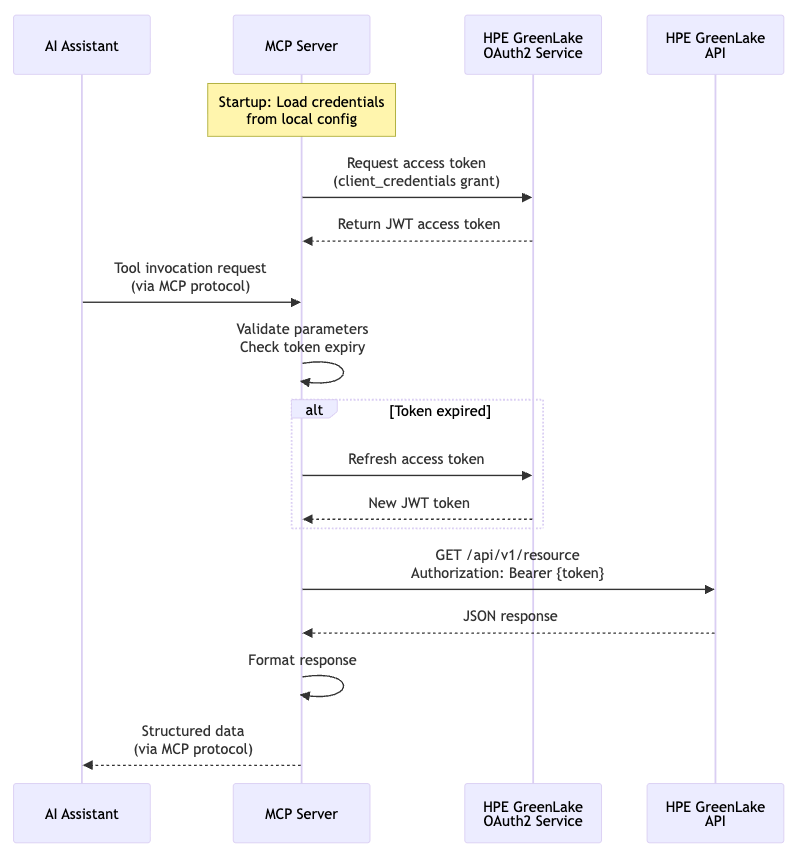
The MCP server handles OAuth2 authentication using the client credentials flow, automatically managing token lifecycle and refresh operations. Your credentials are read from local environment variables or configuration files, never transmitted to the AI service.
Read-Only Operations
MCP servers for GreenLake deliberately expose only GET operations from the OpenAPI specifications. This design choice ensures no unintended modifications, as write options are excluded, allowing users to query extensively without risk of changes. This design choice reduces the blast radius, so even if misconfigured, the server cannot modify infrastructure.
Network Isolation
The MCP server communicates with AI assistants via standard input/output (stdio) rather than network protocols. This means:
- No listening ports: The server doesn't expose network services
- Process-level isolation: Communication happens through OS process pipes
- No remote access: The server cannot be accessed from other machines
- Firewall friendly: Only outbound HTTPS to GreenLake APIs
Credential Management
Following security best practices, MCP servers support multiple credential sources in priority order:
- Environment variables (recommended for development)
- Local configuration files with restricted permissions
- Secure credential stores (platform keychain integration)
Credentials are never logged, and API responses are sanitized to remove sensitive tokens before being shared with the AI assistant.
Real-World Use Case
MCP servers unlock powerful workflows by combining AI reasoning with live GreenLake data:
Audit Log Analysis
Investigating security events becomes conversational: "Show me all failed login attempts from the last 24 hours and identify patterns."
The MCP server enables:
- Querying audit logs with time-based filters
- Natural language parsing of filter syntax
- Pattern recognition across multiple log entries
- Correlation with workspace and user data
- Summary reports with actionable recommendations
Intelligent Device Inventory Management
Managing thousands of devices across distributed infrastructure becomes conversational: "Show me all unassigned compute devices in the production environment". "Which devices haven't been updated in 30 days and are approaching warranty expiration?" "Generate an inventory report showing all PCI-compliant devices with their support levels."
The MCP server enables:
- Querying devices with complex filter expressions
- Natural language parsing of device attributes
- Pattern recognition across device types and states
- Automated capacity planning and forecasting
Subscriptions
MCP servers unlock powerful workflows by combining AI reasoning with live GreenLake data:
"Show me all subscriptions expiring in the next 90 days and their renewal status." "Which subscriptions have less than 20% utilization and could be right-sized?"
The Subscriptions MCP server enables comprehensive subscription analytics. You can query subscriptions with time-based filters, monitor expirations, and verify licenses. The Subscriptions MCP server can identify underutilized resources and forecast renewal costs. This transforms subscription management from a reactive process into strategic planning conversations with your data.
User Management
Security teams identify access risks conversationally:
"Show me all active users who haven't logged in for 180 days and should be reviewed for deactivation." "How many new users were onboarded last month and what's their login activity?"
These capabilities support comprehensive user lifecycle management. The Users MCP server can detect dormant accounts, analyze user growth trends to inform capacity planning, track onboarding metrics, and perform month-over-month comparisons to identify usage patterns.
Getting Started
Setting up an MCP server for GreenLake requires three steps: obtaining API credentials, configuring the server, and connecting your AI assistant.
Prerequisites
- GreenLake workspace with API access
- Python 3.10 or higher
- An MCP-compatible AI client (Claude Desktop, VS Code with Claude Code extension)
Step 1: Obtain API Credentials
From the GreenLake console:
- Navigate to Settings > API Clients
- Create a new API client with appropriate scopes
- Note the Client ID, Client Secret, and Workspace ID
Step 2: Generate and Configure the MCP Server
For this example, we'll set up an audit logs MCP server. The MCP generator tool (used internally by HPE to accelerate development) creates production-ready servers from OpenAPI specifications, though the generated servers can be deployed and configured independently.
# Clone or download the pre-generated MCP server
git clone https://github.com/HewlettPackard/gl-mcp
cd src/audit-logs

# Install dependencies using uv (fast Python package manager)
uv sync

# Configure environment variables
cat > .env.local << EOF
GREENLAKE_API_BASE_URL=https://global.api.greenlake.hpe.com
GREENLAKE_CLIENT_ID=your-client-id
GREENLAKE_CLIENT_SECRET=your-client-secret
GREENLAKE_WORKSPACE_ID=your-workspace-id
MCP_TOOL_MODE=static
GREENLAKE_LOG_LEVEL=INFO
EOF

# Test the server
make test
Step 3: Connect Your AI Assistant
For Claude Desktop, add the server to your configuration file (~/Library/Application Support/Claude/claude_desktop_config.json on macOS). See the following code sample:
{
  "mcpServers": {
    "greenlake-audit-logs": {
      "command": "uv",
      "args": ["run", "python", "__main__.py"],
      "cwd": "/path/to/greenlake-mcp-servers/audit-logs",
      "env": {
        "GREENLAKE_API_BASE_URL": "https://global.api.greenlake.hpe.com",
        "GREENLAKE_CLIENT_ID": "your-client-id",
        "GREENLAKE_CLIENT_SECRET": "your-client-secret",
        "GREENLAKE_WORKSPACE_ID": "your-workspace-id",
        "MCP_TOOL_MODE": "static"
      }
    }
  }
}
For VS Code with the Claude Code extension, create or update .vscode/mcp.json in your workspace. See the following code sample:
{
  "servers": {
    "greenlake-audit-logs": {
      "type": "stdio",
      "command": "uv",
      "args": ["run", "python", "__main__.py"],
      "cwd": "/path/to/greenlake-mcp-servers/audit-logs",
      "env": {
        "GREENLAKE_API_BASE_URL": "https://global.api.greenlake.hpe.com",
        "GREENLAKE_CLIENT_ID": "your-client-id",
        "GREENLAKE_CLIENT_SECRET": "your-client-secret",
        "GREENLAKE_WORKSPACE_ID": "your-workspace-id"
      }
    }
  }
}
Restart your AI client, and the MCP server will automatically connect.
Example Interaction
Once configured, you can interact naturally:
You: "Show me the 10 most recent audit log entries"
Claude (using the getAuditLogs tool with limit=10):
Here are the 10 most recent audit log entries:

1. [2025-01-15 14:32:15] User Management - User admin@example.com logged in
2. [2025-01-15 14:28:43] Device Management - Device server-01 status changed to active
3. [2025-01-15 14:15:22] Workspace - Workspace Production updated
...
The AI automatically invokes the appropriate MCP tool, formats parameters, makes the API call through the server, and presents results in a readable format.
Architecture Deep Dive
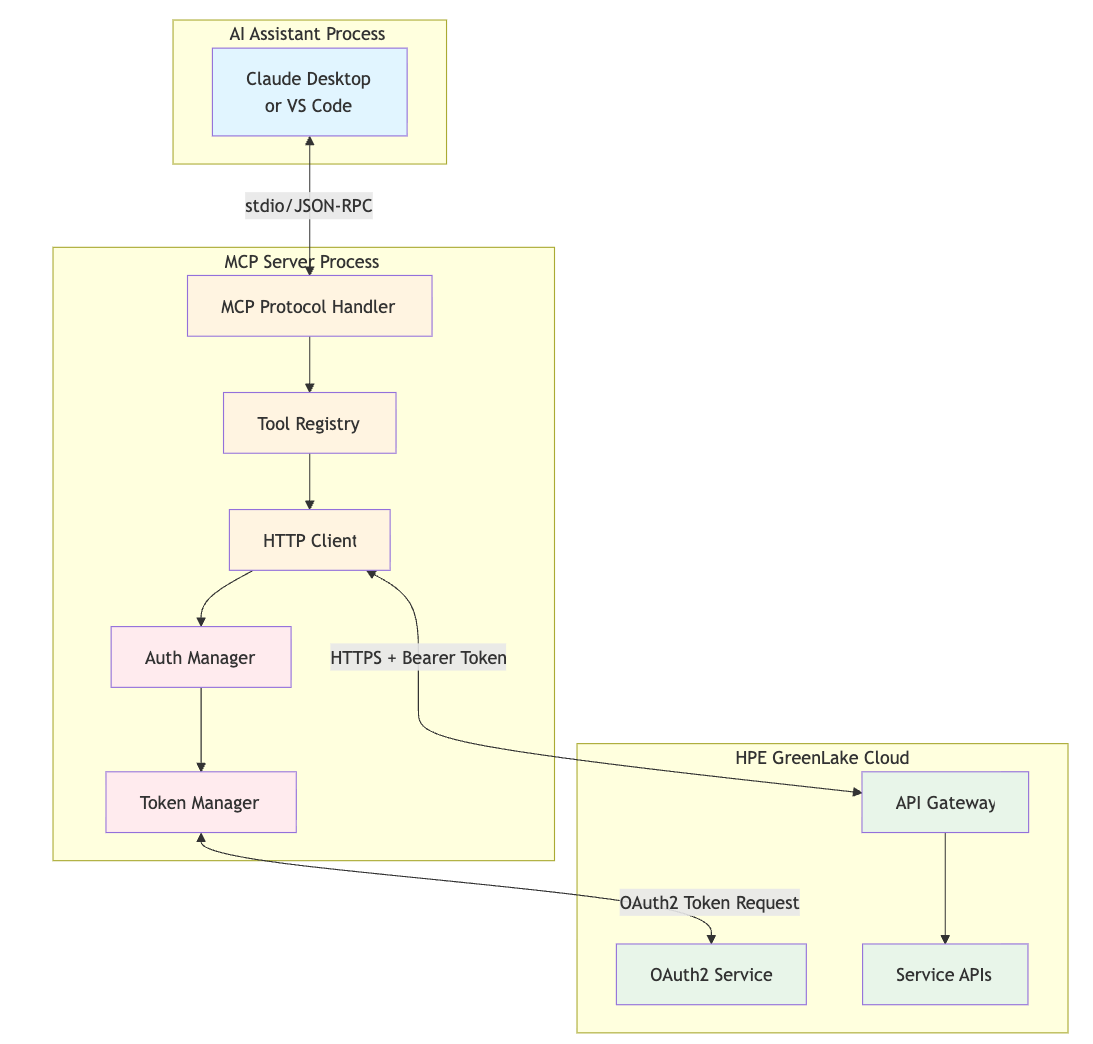
Understanding the internal architecture helps appreciate how MCP servers maintain security while providing powerful capabilities.
Component Overview
Request Flow
- AI Request: The AI assistant formulates a tool invocation (e.g., "get audit logs with category 'User Management'")
- MCP Protocol: The request is serialized as JSON-RPC and sent via stdio to the MCP server
- Tool Resolution: The server's tool registry identifies the corresponding tool implementation
- Parameter Validation: Input parameters are validated against the tool's schema
- Authentication Check: The auth manager verifies token validity and freshness
- API Call: The HTTP client constructs and sends the HTTPS request to GreenLake
- Response Processing: The raw API response is parsed and formatted
- MCP Response: Structured data is returned to the AI via JSON-RPC
- AI Presentation: The assistant formats and presents results to the user
Tool Implementation
Each MCP tool implements a consistent interface:
class GetAuditLogsTool(BaseTool):
    """Tool for querying GreenLake audit logs."""

    name = "getAuditLogs"
    description = "Retrieve audit logs with optional filtering"

    input_schema = {
        "type": "object",
        "properties": {
            "filter": {"type": "string", "description": "OData filter expression"},
            "limit": {"type": "integer", "default": 100},
            "offset": {"type": "integer", "default": 0}
        }
    }

    async def execute(self, filter: str = None, limit: int = 100, offset: int = 0):
        """Execute the audit log query."""
        # Parameter validation
        params = {"limit": limit, "offset": offset}
        if filter:
            params["filter"] = filter

        # Make authenticated API call
        response = await self.http_client.get("/audit-log/v1/logs", params=params)

        # Return structured data
        return response
This abstraction allows the MCP server to expose dozens of API endpoints with minimal code duplication.
Dynamic Mode Optimization
For large APIs, dynamic mode provides significant performance benefits. Instead of individual tool files for each endpoint, three meta-tools handle all operations:
1. list_endpoints - Fast discovery
# Returns: ["GET /audit-logs/v1/logs", "GET /devices/v1/servers", ...]
# Allows AI to browse available operations
2. get_endpoint_schema - On-demand schema loading
# Input: "GET /audit-logs/v1/logs"
# Returns: Full parameter schema, response types, descriptions
# AI learns how to use an endpoint only when needed
3. invoke_dynamic_tool - Validated execution
# Input: endpoint, parameters
# Validates parameters against schema
# Makes API call
# Returns structured response
This architecture scales efficiently to APIs with hundreds of endpoints without overwhelming the AI's context window.
What's Next?
We are actively working on extending our GreenLake MCP Servers capabilities. Stay tuned for future updates.
Conclusion
MCP servers bridge the gap between AI assistants and enterprise APIs, enabling natural language interaction with GreenLake without sacrificing security or control. By running locally and using personal API credentials, they provide a secure, auditable way to extend AI capabilities into your infrastructure management workflows.
The read-only nature of these servers makes them ideal for exploration, reporting, and analysis tasks. Combined with the power of large language models, they transform how teams interact with cloud platforms, shifting from manual API navigation to conversational queries and automated insights.
Whether you're investigating audit logs, documenting infrastructure, or generating compliance reports, MCP servers make GreenLake data accessible where you need it: in your AI-powered development environment.
Related

Getting started with webhooks on HPE GreenLake cloud
Feb 6, 2025
HPE GreenLake cloud integration with ServiceNow using webhooks
Jun 6, 2025No-code integration of HPE GreenLake cloud with ServiceNow
Mar 18, 2025
AI DevCon 2026: Why the future of enterprise AI is a data and storage engineering problem
Apr 3, 2026
Artificial Intelligence and Machine Learning: What Are They and Why Are They Important?
Nov 12, 2020
Closing the gap between High-Performance Computing (HPC) and artificial intelligence (AI)
Sep 15, 2023Demystifying AI, Machine Learning and Deep Learning
Nov 25, 2020