

Automating HPE OpsRamp Software with Terraform: Infrastructure as Code for autonomous IT operations
May 25, 2026Introduction
HPE OpsRamp Software is a platform for driving autonomous IT operations, providing capabilities such as hybrid observability, AIOps-driven event management, and intelligent automation. It is commonly used by managed service providers (MSPs) and large enterprises as the backbone of their operations and observability teams.
Achieving autonomous IT operations often requires more than automating infrastructure. It also involves automating the configuration of the systems used to monitor and manage that infrastructure.
In HPE OpsRamp Software, this includes components such as service maps, device groups, roles, and permission sets. These configurations often need to be customized for each new client onboarded to the platform.
What if you could define all of this declaratively?
What if onboarding could be fully automated using Infrastructure as Code (IaC)?
I’m Enrique Larriba, a Solutions Architect passionate about HPE OpsRamp Software. In this post, I’ll walk you through the Terraform Provider for OpsRamp and show you how it can help automate and streamline your operations.
Install
First, ensure you have either Terraform or OpenTofu installed.
Option 1: Build from source code
Clone the repository and build the provider:
git clone https://github.com/HPE/terraform-provider-opsramp
cd terraform-provider-opsramp
make install
Option 2: Download the binary
Alternatively, download the provider binary and place it in the appropriate directory structure expected by Terraform/OpenTofu:
yourproject/.terraform/providers/<hostname>/<namespace>/<provider>/<version>/<os>_<arch>/<binary>
For example:
yourproject\.terraform\providers\registry.terraform.io\hpe\opsramp\0.1.3\windows_amd64\terraform-provider-opsramp.exe
This works across Microsoft Windows, Linux, and Apple macOS.
Usage
The provider requires an OAuth 2.0 API token to authenticate with the HPE OpsRamp Software. You can generate this token using the custom integration feature.
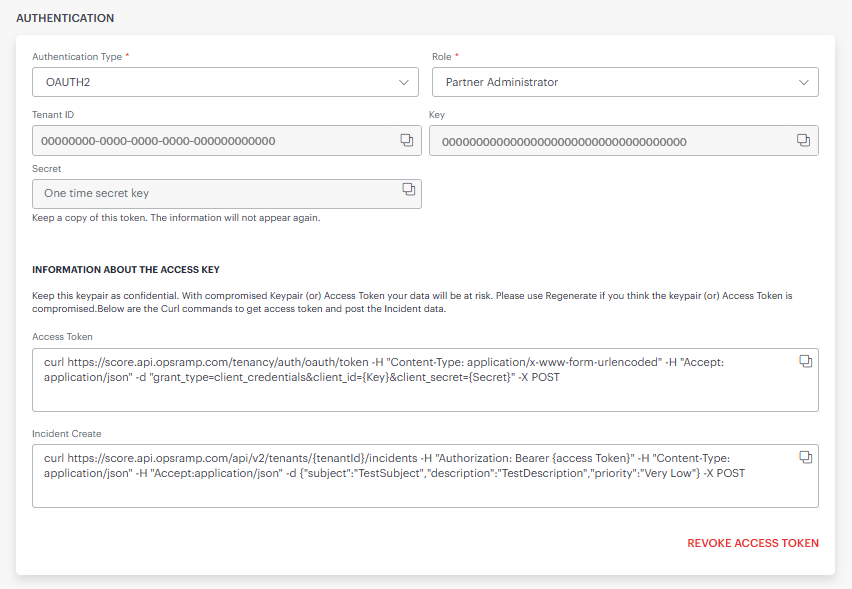
Create a project folder and a file named main.tf. The OpsRamp platform provides a tenant_id, a key (client_id, following the OAuth 2.0 standard), and a secret (client_secret) to configure the provider.
The permissions granted by these credentials depend on the role assigned during their creation. In this example, the Partner Administrator role is used, but you can restrict access to only the permissions required for your use case.
# file: main.tf
terraform {
  required_providers {
    opsramp = {
      source = "registry.terraform.io/HPE/opsramp"
      version = ">=0.1.4"
    }
  }
}

provider "opsramp" {
  client_id     = "00000000000000000000000000000000"
  client_secret = "*****"
  endpoint      = "score.api.opsramp.com"
  tenant        = "00000000-0000-0000-0000-000000000000"
}
This configuration allows Terraform or OpenTofu to load the provider for use in subsequent steps.
Run the following command to initialize the project:
# Terraform
terraform init
# OpenTofu
tofu init
Simple scenario
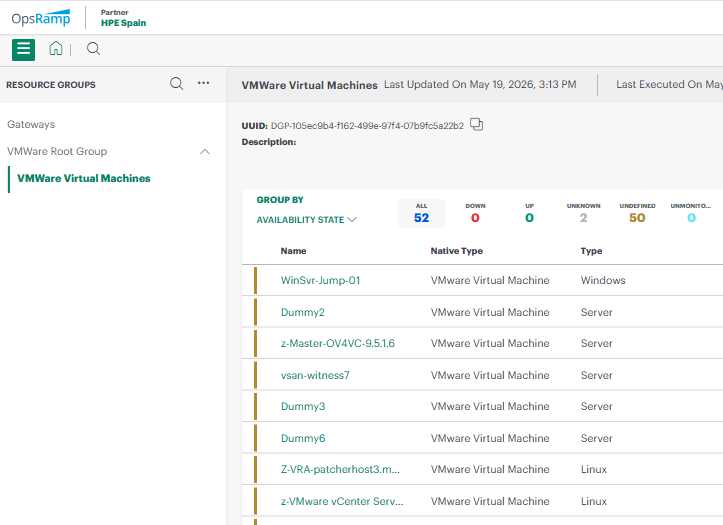
Create the following example file. It contains the declaration of a device group. This resource can group VMware virtual machines based on a custom attribute such as ENV=PROD.
# continue main.tf
resource "opsramp_device_group" "device_group_root" {
  name      = "VMWare Root Group"
}

resource "opsramp_device_group" "device_group_query" {
  parent       = opsramp_device_group.device_group_root.id
  name         = "VMWare Virtual Machines"
  search_query = "nativeType = \"VMWare Virtual Machine\" AND tag['ENV'] = \"PROD\""
}
Place this resource definition below the provider block in main.tf. The tool will take care of creating, updating or deleting resources as needed.
Apply the configuration to create the resources in HPE OpsRamp Software:
# Terraform
terraform apply
# OpenTofu
tofu apply
After running this command, you should see Terraform report that the resource group was created successfully.
Extended scenario
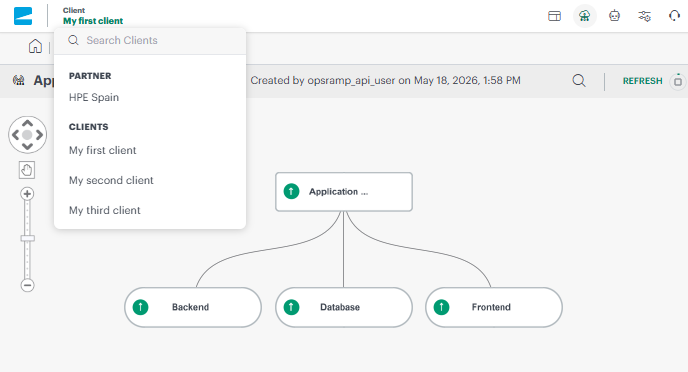
More advanced examples require additional resources. You can automatically create clients, the unit of multitenancy; service maps, roles, users, groups, and more. In the following example, you will deploy three clients with a standardized service map. First, you need to create a module directory that will declare what's needed on each client.
# file: modules/client/main.tf
terraform {
  required_providers {
    opsramp = {
      source = "registry.terraform.io/HPE/opsramp"
      version = ">=0.1.4"
    }
  }
}

resource "opsramp_client" "client" {
  name      = var.client_name
  time_zone = "Europe/Paris"
}

resource "opsramp_device_group" "frontend_group" {
  client = opsramp_client.client.unique_id
  name   = "Frontend"
}
resource "opsramp_device_group" "backend_group" {
  client = opsramp_client.client.unique_id
  name   = "Backend"
}
resource "opsramp_device_group" "database_group" {
  client = opsramp_client.client.unique_id
  name   = "Database"
}

resource "opsramp_servicemap" "sm_root" {
  client = opsramp_client.client.unique_id
  name = format("Application - %s", var.client_name)
  type = "Service"
}

resource "opsramp_servicemap" "sm_child1" {
  client = opsramp_client.client.unique_id
  name = "Frontend"
  type = "Resource"
  parent = opsramp_servicemap.sm_root.id
  search_query = "deviceGroups.name = \"Frontend\""
}

resource "opsramp_servicemap" "sm_child2" {
  client = opsramp_client.client.unique_id
  name = "Backend"
  type = "Resource"
  parent = opsramp_servicemap.sm_root.id
  search_query = "deviceGroups.name = \"Backend\""
}

resource "opsramp_servicemap" "sm_child3" {
  client = opsramp_client.client.unique_id
  name = "Database"
  type = "Resource"
  parent = opsramp_servicemap.sm_root.id
  search_query = "deviceGroups.name = \"Database\""
}
This module uses client_name as an input variable to parameterize each client configuration. Create a variables.tf file within your module:
# file: modules/client/variables.tf
variable "client_name" {
  description = "Name of the client to be created"
  type        = string
}
Then the main.tf file will use the recently created module for client creation. All these clients will be standardized by populating the template.
# file: main.tf
provider "opsramp" {
  client_id     = "00000000000000000000000000000000"
  client_secret = "*****"
  endpoint      = "score.api.opsramp.com"
  tenant        = "00000000-0000-0000-0000-000000000000"
}
module "client_1" {
  source = "./modules/client"
  client_name = "My first client"
}
module "client_2" {
  source = "./modules/client"
  client_name = "My second client"
}
module "client_3" {
  source = "./modules/client"
  client_name = "My third client"
}
After applying the configuration, the platform creates all required clients.
Next steps
Infrastructure as Code enables scalable and repeatable operations. This provider will continue evolving to support more use cases and deeper integration with the HPE OpsRamp Software API.
Your feedback and contributions are welcomed. Feel free to open issues, submit feature requests, or contribute directly to the Terraform Provider for OpsRamp repository.
Continue exploring the HPE Developer Community blog to learn more about HPE OpsRamp and discover new ways to use it in your daily operations. By learning, sharing, and contributing as a community, we can move closer to fully autonomous IT operations.
Related

How to Transform IT Operations with AI-Infused, Full-Stack Observability
Dec 2, 2024HPE OpsRamp Continues to Push Autonomous IT Operations Forward
Dec 2, 2024
Hybrid observability service – Part 1: Provisioning and activation in HPE GreenLake Flex Solutions
May 22, 2025Hybrid observability service – Part 2: Initial configuration to enable the discovery of resources in HPE GreenLake Flex Solutions
May 23, 2025Hybrid observability service – Part 3: Enabling the monitoring of agentless SSH-enabled systems in HPE GreenLake Flex Solutions
May 26, 2025Hybrid observability service – Part 4: Enabling the monitoring of physical devices in HPE GreenLake Flex Solutions
May 27, 2025
Observe any observable using HPE OpsRamp — Part 3: Testing the stack with otel-cli and promtool
May 4, 2026